
Printing Variable Data Labels Leave a comment
We get questions a lot about printing variable data on labels printed with our inkjet or led/laser color label printers. We thought it would be a good idea to walk through some of the most common areas of focus when it comes to printing variable data information on your labels.
But first…
What is variable data?
Variable data refers to information that changes on every label or on every batch of labels printed. It is usually meant as a form of identification for some purpose related to product information or traceability but it can also include things like personalization.
By printing variable data, you are dynamically printing constantly changing information on your labels without having to change that specific piece of information manually every time you print a label.
If you have ever printed address labels out of Microsoft Excel or Microsoft Word, you may have used this technique before. If you have a sheet of labels in your laser printer that needs a different address printed on everyone, these programs allow you to import a spreadsheet containing the address information and automatically print each address on a separate label.
This way you can maintain all of your addresses in an easy-to-use spreadsheet and quickly print them. This is much easier than typing out each address onto each label manually and having to move things around and make adjustments to the sheet layout every time an address changes or is added or removed.
Examples of variable data
As referenced above, printing variable data can take many shapes and forms and be used for anything from legal compliance or fun ways to engage your customers. Here are a few of the most common:
- Lot Numbers
- Serial Numbers
- Product Variations (color, size, etc)
- Personalization (a grooms and bride’s name on a bottle of wine)
- Direct Mail (brochures, envelopes, etc)
To draw a comparison, here are some things (with some exceptions) that are likely not considered variable data:
- Label artwork
- Product formulas or ingredients
- Your website
While these are most common, there is no rule for what can or cannot be used as variable data. We’ve even worked with customers who need their artwork to be dynamic. It just comes down to what you need. And it really doesn’t matter since variable data is simply the information you need to change dynamically.
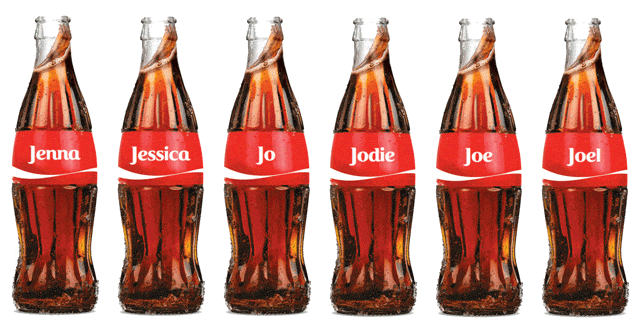 example of personalization using variable data
How does it work?
Variable data label printing works by pulling those dynamic data values (lot numbers, serial numbers, etc) from a database of some kind and inserting them into a place on the label that you have defined.
The things required for working with variable data:
- A database to store your variable data
- A program capable of reading and printing dynamic data
- A printer (thermal, inkjet, laser, etc)
Variable data label printing works by first storing your variable data in some sort of database. Don’t let that word scare you. Nearly everyone has worked with Microsoft Excel. A spreadsheet is a very simple database and many times is the only thing you need for storing your variable data and integrating it into your label printing (more on the integration later).
Next, you’ll need a program that can read and process the data in your database and generate individual labels based on your stored data in the desired order and placement. As mentioned above, this can be as simple as using Microsoft Word. This may work fine for a very simple DYI approach but in most situations, something more robust is needed. We use Seagull Scientific’s Bartender product for most of our customer projects.
Bartender is the industry leader in variable data and barcode label printing. Even the basic version of their software is incredibly powerful, has an interface similar in many ways to Microsoft Word and is very easy to learn and use. Other products include Labelview and NiceLabel. All of these software packages are purpose-built for working with variable data.
Finally and most obviously, you’ll need a printer for your labels.
Variable label printing comes in many shapes and sizes:
- Thermal Label Printers (direct or thermal transfer) – These are usually basic black and white labels used for addresses, product data or shipping information (UPS labels for example)
- Laser or Inkjet Sheet Label Printers – Work well in consumer inkjet printers and laser printers
- Color Inkjet / Laser Labels – Prints roll-to-roll using ink or toner. Perfect for larger volumes or where higher quality images are required (i.e. product labels)
Advantages of variable data printing
Getting started with variable data label printing can take some effort to get started. However, as with any new business process, the benefits are numerous and necessary for continued growth and scalability. Here are several advantages of using a variable data label printing solution:
- Free up valuable resources – Variable label data applications allow you to automate most of your label printing tasks so you free up time for your users to do other, more important things.
- Easier data management – Easily store, edit and share your variable data in a database such as Microsoft Excel, Access or any other method. You can even work with the data directly in your ERP or accounting system so a separate database is not needed.
- Automations galore – Imagine a scenario where an eCommerce order for 50 widgets, triggers the printing of 50 labels for those products automatically. Or, allowing all of your users to print labels as required by using a simple web interface to select the data they need and the number of labels to print. All of these and more are
The advantages of variable data label printing and automations are numerous and undeniably valuable. There are very few limitations to the number of applications and solutions available. Chicago Color Label has over 15 years of experience consulting with customers and developing solutions to improve their label printing processes.
There isn’t much we haven’t seen. Please contact us or leave a message in the comments if you have any questions. We love these projects and look forward to helping you!